The dashboard is your morning page. It shows what is happening across the workspace in one view, so you can decide where to go next. It is for scanning, not for doing the work itself.
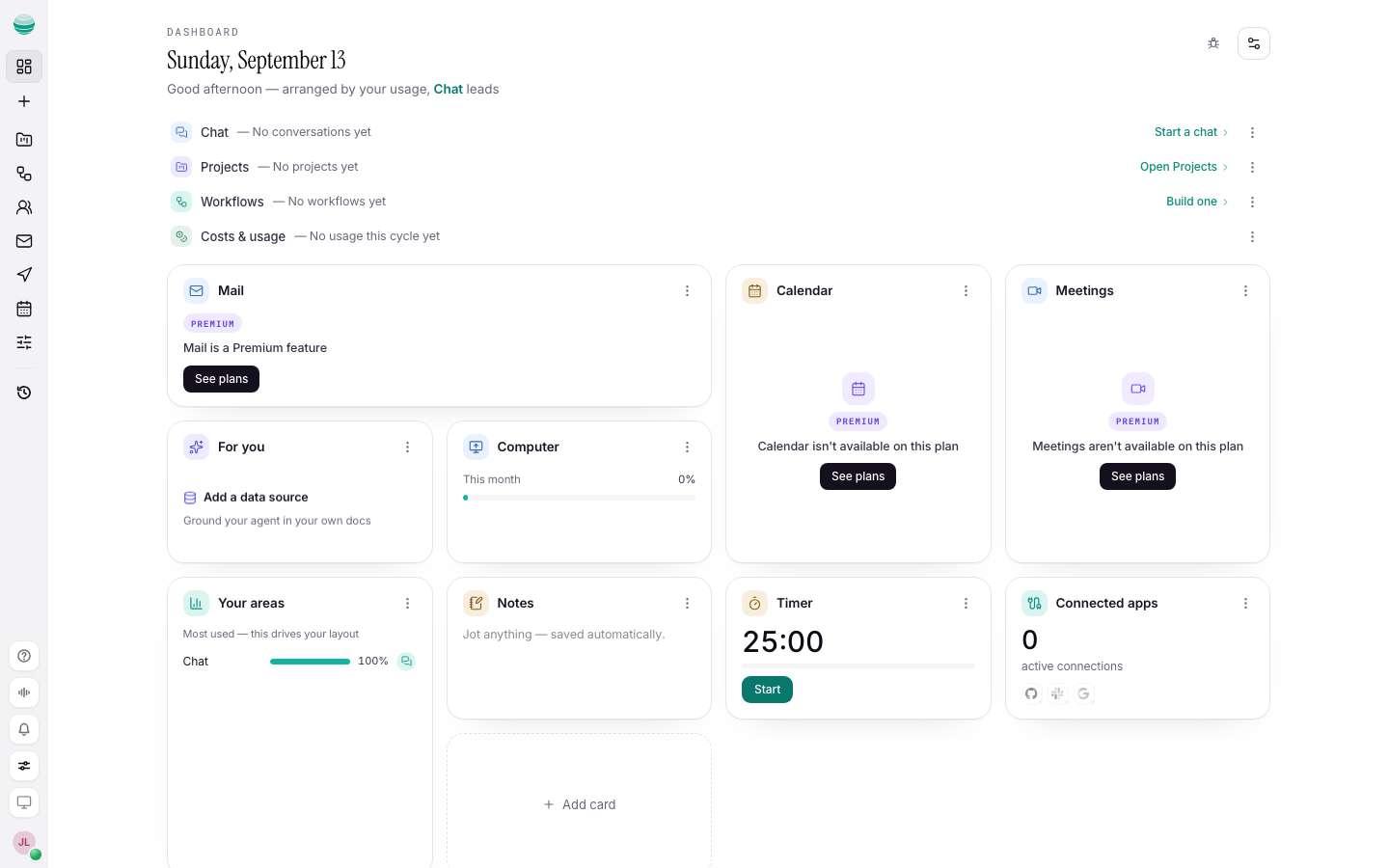
Read the dashboard
The top of the page names the day. The cards below cover the rest of the workspace: Chat, Projects, Workflows, Mail, Calendar, Computer, connected apps and usage.
Each card is in one of three states:
| What you see | What it means | What to do |
|---|---|---|
| Live figures or items | The area has work in it | Choose the card's button to open the area |
| An empty line, such as "No workflows yet" or "No mailbox connected" | Nothing is running there yet | Use the card's button, such as Get a mailbox or Start a chat, to set it up |
| A Premium badge | The area needs a paid plan | See Billing and credits |
Do not try to manage work from the dashboard. Each card's button opens the real page, such as Open Mail, Open Workflows or Open Calendar.
Check your usage
The usage card shows how much of this cycle's allowance you have used. If it reads "No usage this cycle yet", nothing metered has run. For detail, open Settings → Usage. See Billing and credits.
When to skip it
If you are in the middle of one chat, stay in Chat. Come back to the dashboard when several jobs are running, or when you share the workspace with a team.